
Studio with professional camera, microfono, and ladder with different camera lenses
RedGIFs News

Manage Alias Links More Easily With RedGIFs Studio

Alias Links give you more control over how your content is shared across the internet.

They are not new, but RedGIFs Studio makes them easier to manage and easier to use. As more creators explore Studio, many are discovering Alias Links for the first time, or finally putting them to work in a way that fits their workflow.

What Are Alias Links?

Alias Links let you create multiple shareable links for a single piece of content. Each link points to the same post, but can be used in different places for different purposes.

Creators use Alias Links for all kinds of reasons, including:

  • Sharing the same content across multiple platforms
  • Cross posting to subreddits while using a fresh link each time.
  • Tracking performance and testing what drives the most clicks

Why Studio Makes Alias Links Better

Inside RedGIFs Studio, Alias Links are more visible and much easier to work with. You can see your links in context, manage them alongside your content, and quickly create new links without digging through menus.

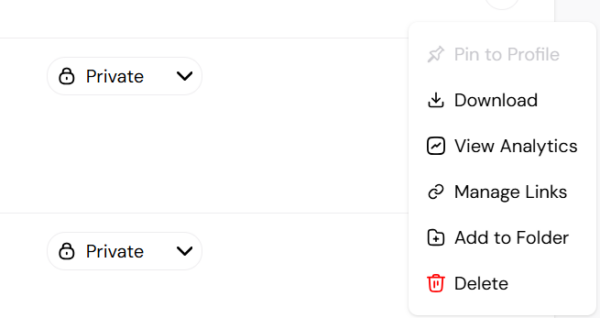
You can find them directly from any piece of content by clicking the three dots and selecting ‘Manage Links.’

manage links (1)

As Studio continues to evolve, surfacing tools like Alias Links is part of making sure creators have clear, practical control over how their content moves across the internet.

If you are already using Studio, Alias Links are waiting for you. If you are not, this is one more reason to get verified and start!